Table of Contents
SYSLESS
Adding or changing special system lessons in SYSLESS
Overview
The site system lesson list 1) sometimes needs to be modified to confer special abilities and authorize reserved commands to be used.
| BIT | symbol | Description |
|---|---|---|
| 1 | bin | high priority on saving binary or condensing lesson |
| 2 | sys | system lesson |
| 3 | ppt | ppt commands allowed (automatically set if *sys* used) |
| 4 | s1p | stop1 protected |
| 5 | wrt | can write to cm/ecs (must also have *sys* bit set) |
| 6 | jmp | jumpout allowed from non-system lesson |
| 7 | acc | generate usage accounting data |
| 8 | nio | can use -netio- commands |
| 9 | pca | obsolete |
| 10 | mas | can use -masreq- commands (must also have *sys* bit set) |
| 11 | mpsys | micro plato system lesson only (automatically set if *sys* used) |
| 12 | d3 | lesson can be deleted while in use, regardless of the values of *d1* or *d2*, if the config parameter *sysdl* = *on*. |
| 13 | nv | allow n-version of lesson system priv. (n-version has same attributes as regular lesson except ecs deletion, binary and ecs charge attributes) |
| 14 | sysnv | allow n-version of lesson system priv. same as *nv*, except used by development systems only. has no effect on non development systems. |
| 15-24 | (not used) |
Adding a SYSTEM lesson
There are two ways to add or modify the characteristics of a system lesson.
- Change the content of code file *sysless* (via *plmods* currently)
- Use lesson *s0syslst*
The *sysless* method is to be used the add lessons considered to be core to the operation of the system - release lessons.
The *s0syslst* can be used for site specific lessons, personal work spaces, temporary testing, and the like.
Lessons may NOT be on both lists.
In *sysless*, lessons must be kept in alphabetical order. See the case study below for an example entry.
At system load time the files from s0syslst and sysless are merged into a single list. This happens early on in lesson s0init with this line
do sysless $$ system lesson table
Unit sysless is used from lesson s0syslst.
Up until 11/16/2023 the procedures described below were necessary the “effectuate” lessons added in syslees. This was due to an oversight in s0syslst unit sysless. That problem has now been corrected and discussed below in the next section.
11/16/2023 Correction
Prior to this date the code in unit sysless of lesson s0syslst did these basic things
- Read the table of release system lessons from sysless in EM
- Copy the lessons from s0syslst to the top of a new copy of what will become the final system lesson table
- Copy the release system lessons from a “cache” common
- Resort the entire merged list
- Write the new merged / sorted list to the EM system lesson table
Unfortunately new or changed lessons from sysless were not put into the cache common and were ineffective. But a fix was possible. The new basic action of unit sysless is:
- Read the table of release system lessons from sysless in EM
- Copy the sysless entries to the “cache” common
- Copy the lessons from s0syslst to the top of a new copy of what will become the final system lesson table
- Copy the release system lessons from a “cache” common
- Resort the entire merged list
- Write the new merged / sorted list to the EM system lesson table
The following lines 5-8 were added to unit sysless
 1  do      loadov          $$ and load into EM
 2  *
 3  calc    lslots := int(nlsnwds/2)  $$ slots
 4  *
 5  if      not(editor)     $$ need to update common with EM
 6  .       calc    nless := int((sltlen - 202) / 2)
 7  .       transfr rlesbuf(1);rsyslsn(1);sltlen-202
 8  endif
 9  *
10  *
11  branch  (nless+nlocal) > lslots,2many,x
12  *
13  ***     zero sysless buffer
14  zero    lesbuff(1),nlsnwds
15  *
16  * move lessons from local list to sysless buffer
Case Study: NOTESYS
In order to give system lesson notesys WRT (read/write CM/ECS permission) the line in COMPASS deck SYSLESS that reads:
LTYPE NOTESYS,(BIN,SYS,D2,SYSNV)
must be changed to
LTYPE NOTESYS,(BIN,SYS,WRT,D2,SYSNV)
What is expected is that the macro LTYPE fills out a table in the SYSLESS overlay that is referenced to check system lesson permissions.
Complications
Assembling changes into the SYSLESS overlay is insufficient to create the desired effect. This is due to the common s0syslist in tutor file sysfile overriding the parameters specified in the SYSLESS overlay. This common is (effectively) an operational cache that not only contains a copy of the previous SYSLIST overlay values, but also the local site system list cache. During initialization, the contents of the common replace the values in EM 2) this special overlay via a callout from s0init (using code from s0syslst).
Updating the Cache
In addition to making the required edits to the SYSLESS overlay, there are two ways to fix the sysfile caching problem.
ALWAYS edit deckSYSLESSand do a new build for released system lesson list changes.
If SYSLESS is not properly modified, the “REFRESH” method will not work. The “Temporary Method” will only work if no new system lessons were added to SYSLIST.
Warning
Both of these methods involve making changes to important parts of PLATO. Do NOT do this unless you are certain of what you are doing.
Temporary Method
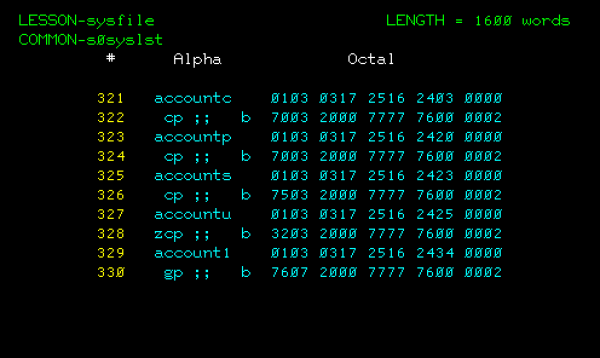
It is possible to modify the common directly using the knowledge provided in the overview. This is risky but if the system lesson already exists you can find it in the proper portion of the common.
The layout of the common as of this writing is:
 Common layout:

      buffer address  buffer description
      --------------  ------------------
      0001 - 0100     header information
      0101 - 0220     local system lessons
      0221 - 1280     release system lessons
In the example, we located the released system lessons (containing test case NOTESYS) starting at word 321. The format of the common is (essentially) a collection of lesson names followed by a word with bits set for the lesson permissions.
Once a proper backup has been taken:
- Back out all active users before editing the common
- Using maintenance credentials in group
p- Enter file
sysfileand access commons0syslst - Abort the common (this prevents the system's resident portion of the common in EM 3) from overwriting the changes.
- Edit the commmon
- Shut Down PLATO
- Restart PLATO and check the lesson permissions using lesson
s0syslistoption 1.
REFRESH Method (Recommended)
In system lesson s0syslst, the built in common validation utility may be used to refresh the cached common 4). This option is recommended method for lessons added to the SYSLESS deck and will re-write the released lesson portion of the common file.
Tip
If desired, you may copy the common to another file for later comparison.
As a group s records user:
- Invoke lesson
s0syslst - Press
SHIFT-DATAfor special options. - Select option
1to disable local modifications. - Press
SHIFT-HELPto disable local modifications.. - Press
BACKtwice to return to theSYSTEM MODEpage. - Press
SHIFT-STOPto sign off. - Shutdown PLATO and NOS in the normal manner.
At this point, the system should be re-started with the modified deadstart tape containing the modified SYSLESS PLATO overlay.
- During initialization of control point
PLA1, you will not see the usualLOCAL SYSTEM LESSONS INSTALLEDmessage on the console. - Log in to CYBIS using group
srecords. - Invoke Lesson
s0syslst - Press
SHIFT-DATAfor special options. - Select option
3Run common verification utility. - Press
SHIFT-HELPto update common information.
This step updates the common from theSYSLESSversion of the system lessons. Local lessons lists will be preserved. - Press
BACKto return to the mainSystem Lesson List Management Utilitypage. - Select option
1Check options assigned to a lesson, and verify that the desired system lesson is recognized and has the expected permissions.
In our example - we were seeking the wrt attribute on lesson NOTESYS.
- Press BACK to return to the main
System Lesson List Management Utilitypage. - Press
SHIFT-DATAto get toSpecial Options. - Select option
1Enable local modifications. - Press
SHIFT-HELPto re-enable local system lessons. - Restart CYBIS.
The system should come up with all the local system lessons + the new SYSLESS settings from deck SYSLESS.