Contributing to Retro1.Org
Retro1.Org and its support systems are maintained by a small number of technology professionals dedicated to conserving the work of our member communities and making that work available to other hobbyists, conservationists, and experts. The core work is intended to support the primary mission.
Retro1.Org Mission
Conservation of historically significant pioneering works that gave rise to the digital world in which we live today.
Overview
While Retro1.Org does not currently accept monetary contributions of any kind, contributions to Retro1.Org can be made through a variety of actions:
- Helping to maintain, refine and enhance community documentation.
- Contribution of topical materials in specific areas of interest. For example, we are preparing to launch a DEC (Digital Equipment Corporation) section to the conservation efforts and will be looking for active contribution in that domain.
- Software Development and Conservation work in any of the established community domains.
and we welcome other suggestions for improvement of the site!
“All information on this site is provided ‘as is’ without any warranties, expressed or implied.”
I just want to set up my own system.
Our most frequent request from new hobbyists and researchers is: How do I set up my own system?.
Registration here is not needed for that objective. Depending on your learning objectives, you MAY want to register to browse through PLATO, CYBIS, TUTOR, NOS or VM/Community Edition source code. For purposes of just seeing things run, you will probably not need access to the browseable source repositories.
I need support for ...
Depending on the topic of interest, our contributors may be participants in:
- Groups.IO topic specific groups.
- Cyber1.Org's PLATO System.
- Various e-Mail Lists
Because Retro1.Org is dedicated to conservation efforts, our objective is to provide navigational help to the various resources with which our contributors are most familiar. We also provide reference materials and tutorials to assist the learning process for aspiring hobbyists.
Registration here is not needed for that objective. Depending on your learning objectives, you MAY want to register to browse through PLATO, CYBIS, TUTOR, NOS or VM/Community Edition source code. For purposes of just seeing things run, you will probably not need access to the browseable source repositories.
CDC CYBER
Setting up your own CDC CYBER system is clearly documented in multiple locations but the best starting point is to follow the detailed instructions found on Kevin Jordan's Nostalgic Computing Center 1) GitHub Repository. There you will find multi-platform instructions to install:
- COS - The Chippews Operating System.
- HUSTLER - A derivative of the SCOPE operating system.
- KRONOS2.1 - The logical ancestor of NOS 1 and a logical descendent of COS.
- NOS1.3 - A logical descendent of KRONOS.
- NOS2.8.7 - The last operating system formally release by CDC for its Cyber 170 series supercomputer.
- NOS/BE - A descendent of COS and SCOPE.
Kevin's work has reduced the manual, time-intensive procedure which could take hours to perform accurately to a matter of minutes!
PLATO Installation
If your needs are focused on PLATO/CYBIS, then you may start with the learning path PLATO Installation (dtcyber) which will provide further specific guidance.
Experiencing PLATO In Action
If your needs are simply interacting with the PLATO community and generally learning about PLATO, you are encouraged to visit CYBER1.ORG and join their vibrant community of users!
VM/370 Community Edition
Setting up your own VM/370 Community Edition installation requires installation of the Software Development Laboratories 2) version of Hercules now called “Hyperion”. The Official Starting Page will get you started and the vibrant communities on Groups.IO as well as Discord.Com will get you started on your way!
Accessing The Archives
As of 2026, the vast majority of the site content has been opened for public browsing. There are, however, some protected areas which require registration:
- Detailed / Annotated Source Code
- Viewing and Searching of the historical E-Mail Archives
- Protected content specific to a subject domain by contributors whose work is still “in progress”.
- Special software conservation tools and information bases.
For any other objectives, you may not need to register!
Becoming a Contributor
Although you will be required to authenticate separately for the Mail Archives and the CODEX, they use shared credentials.
Contribution of content is prepared in private collaboration spaces, specifically assigned to a particular contributor and others collaborating on the same topic, not visible to the public until it is published by the site administrators. Editorial curation of some content and “look and feel” is reserved to the site administrators. The content has undergone significant revision over the years but your editorial integrity as a contributor is respected along the way.
The Mail Archive Viewer
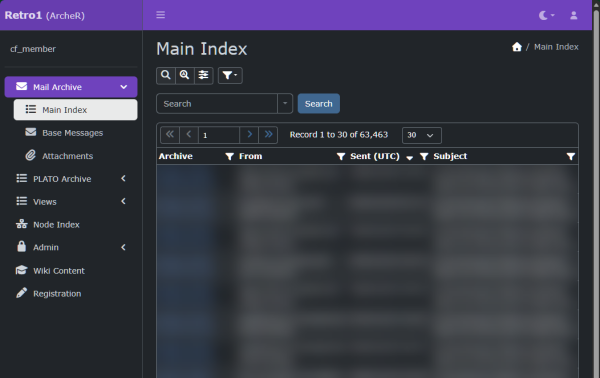
ArcheR 3) was created as a unified archive viewer that periodically replicates the contents of the associated mail lists to ensure long-term preservation of the archives which were nearly lost. ArcheR also contains various project-specific information bases used by archivists to track conservation work past and present.
Contribution of Content
Proficiency with the Retro1.Org markup capabilities4) takes practice. If there's a content objective that seems like it is taking more work than it should, ask for assistance.
The most recent pages have some of the more modern markup conventions and they may have ideas from which you may take inspiration. The last modified date appears in the page footer. 
Markup We Use
Retro1.Org uses Dokuwiki's extensible markup support to render the articles throughout this CODEX.
You should acquaint yourself with our dialect of this markup language by reading the article Getting Started Tips.
https. Your browser may issue a warning when navigating to this site and this is an exception you will need to make using modern browsers.