Phase 4 - Add More Support for L1P Terminals
— William Schaub, Dale Sinder and Steve Zoppi 2025/05/09
Complete Phase 3 First
It is vital That Phase 3 be completed before Phase 4!
Tutorial Phases
Tip
The tutorial phases are arranged in a prescribed order, wherein each phase builds upon the previous. Performing these activities out of order will leave the installation in an inconsistent, or perhaps inoperable state.
Objective
In Phase 4, we implement the subsequent functionality that was provisionally laid out by the previous 2 phases.
The implementation of these features now includes:
- Wider screens
- Pixel resolution pointing
- Terminal Capability report
Procedure
- Quiesce CYBIS Normally.
Take CYBIS Down
Although in this specific circumstance, the following steps can be completed by
cdc.ioon a running CYBIS system. You are never encouraged to do so.
- From Phase 0 - Prepare Work Environment, we obtained and applied the modifications used in Phase 3 - Add CONDEN, PLATO, FORMAT Support for L1P Terminals. Returning to the directory
l1ppmods.20250527, a WINDOWS command filecdc.io.copyover.cmdmay now be used to import them001.sinder.mods.bpatch set. :
Re-verify the modification set: (Windows Example) cdc.io.copyover.cmd ^ "m001.sinder.mods.b" ^ "C:\Path\To\DtCyber\disks" ^ test :: Processing "m001.sinder.mods.b\alien.retro1.txt" :: Processing "m001.sinder.mods.b\cybmods001.s0sup.txt" :: Processing "m001.sinder.mods.b\fancy.retro1.txt" :: Processing "m001.sinder.mods.b\l1pmods001.s0sup.txt" :: Processing "m001.sinder.mods.b\nedit.s0nver.txt" :: Processing "m001.sinder.mods.b\nmem.s0nver.txt" :: Processing "m001.sinder.mods.b\nplato.s0nver.txt" :: Processing "m001.sinder.mods.b\ns0caps.s0nver.txt" :: Processing "m001.sinder.mods.b\ns0edit.s0nver.txt" :: Processing "m001.sinder.mods.b\ns0notes.s0nver.txt" :: Processing "m001.sinder.mods.b\ns0terms.s0nver.txt" :: Processing "m001.sinder.mods.b\nuser.s0nver.txt" :: Processing "m001.sinder.mods.b\plmods001.s0sup.txt" :: Processing "m001.sinder.mods.b\ptest.retro1.txt" :: Processing the Results ... ---------- (STDOUTPUT).TXT ---------- (ERROUTPUT).TXT :: :: TEST COMPLETE: :: You may proceed if the only lines that appear above resemble: :: ---------- (STDOUTPUT).txt :: (or) ---------- (ERROUTPUT).txt :: When everything looks correct - you may apply the changes by supplying the "write" option: (Windows Example) cdc.io.copyover.001.cmd ^ "m001.sinder.mods.b" ^ "C:\Path\To\DtCyber\disks" ^ write :: Processing "m001.sinder.mods.b\alien.retro1.txt" :: Processing "m001.sinder.mods.b\cybmods001.s0sup.txt" :: Processing "m001.sinder.mods.b\fancy.retro1.txt" :: Processing "m001.sinder.mods.b\l1pmods001.s0sup.txt" :: Processing "m001.sinder.mods.b\nedit.s0nver.txt" :: Processing "m001.sinder.mods.b\nmem.s0nver.txt" :: Processing "m001.sinder.mods.b\nplato.s0nver.txt" :: Processing "m001.sinder.mods.b\ns0caps.s0nver.txt" :: Processing "m001.sinder.mods.b\ns0edit.s0nver.txt" :: Processing "m001.sinder.mods.b\ns0notes.s0nver.txt" :: Processing "m001.sinder.mods.b\ns0terms.s0nver.txt" :: Processing "m001.sinder.mods.b\nuser.s0nver.txt" :: Processing "m001.sinder.mods.b\plmods001.s0sup.txt" :: Processing "m001.sinder.mods.b\ptest.retro1.txt" :: The contents of (STDOUTPUT).txt and :: (ERROUTPUT).txt :: Should be evaluated for any possible errors :: :: If you mis-allocated a file - those errors will appear here. :: :: (ERROUTPUT).txt contains the following: :: :: :: [End Of Output] - Bring CYBIS back up.
- Modify code file
maintpblock 3-fgetmods to edit the newly-imported code file namel1pmods001and change the lineplmods001as shown in yellow:
pf(pf,ins,z),mods,-blabel,-rew/plmods001 ← Modified line pf(pf,ins,z),mods,-blabel,-rew/tpmods pf(pf,ins,z),mods,-blabel,-rew/gogomods pf(pf,ins,z),mods,-blabel,-rew/l1pmods001 ← Modified line - Modify code file
maintpblock 3-ggetcmods to include the newly-imported code filecybmods001by changing thepfdirective forcybmodsas shown in yellow:
.* exit *cybmods* contains all mods .* pf(pf,cybmods,z),mods,as,-blabel,-rew/cybmods001 * ife($cybmodf$.ne.$none$,persnl) pf(pf,cybmods,z),mods,as,-blabel,-rew/cybmodf endif(persnl) * pack(cybmods) revert. - Do a full system assembly
- Make a new deadstart tape
- Restart the system with the new tape.
- Run lesson
mem.- Select option 1.
- Enter o214 and press ENTER.
- On screen, note that the first word listed has very few bits set:

- Test lesson
nplatofirst, by connecting to the system using the PlatoAccess terminal emulator and ensuring that the new capabilities are present.
- Repeat the same
memoperation as above. The first word now looks like:

- There are more bits set providing a very granular description of what the terminal supports.
- Using Lesson
operator(Copyover Function)
ns0caps→s0caps→os0capsnplato→plato→oplato
- Condense lesson
plato
- Logout and back in again
- Test then copy over and condense these
nedit→edit→oeditnmem→mem→omemnuser→user→ouserns0terms→s0terms→os0termsns0notes→s0notes→os0notesns0edit→s0edit→os0edit


Success!
The following features should now be visible:
- Run lesson
ptestoption g. You will not be able to get the + right of the line by clicking: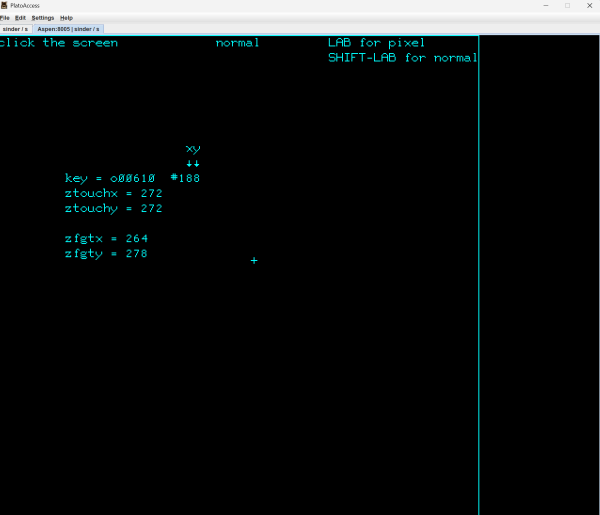
- Now press LAB to switch on pixel resolution pointing and click right of the line:
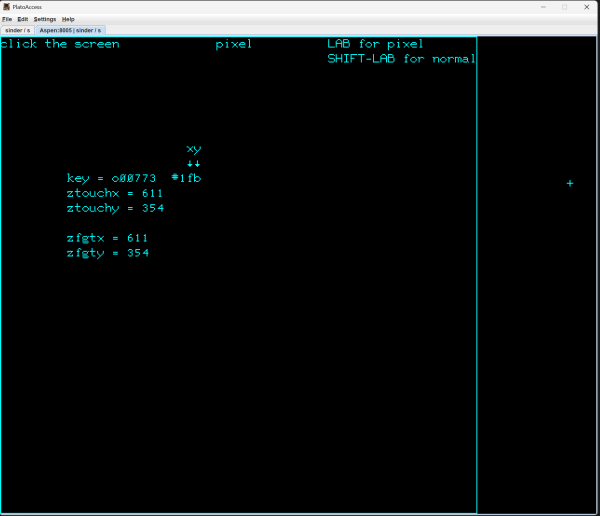
Note that the plus sign
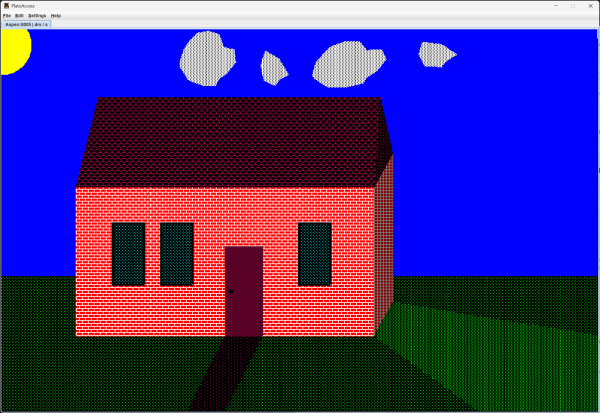
+will now go exactly wherever you click. - Graphic on a 800 pixel wide terminal:


DO ANOTHER BACKUP
Practice backing up your incremental changes.
See Phase 3A - Differential Backup
Proceed to Phase 5 - Documentation